
Inventory Management Software for Indian Businesses
Stock that updates with every bill and purchase, items identified by barcode, and a clear view of what to reorder, from any device.
Know your stock without counting every shelf
Stock problems rarely come from one big mistake. They come from many small ones: a sale billed without an item, a purchase never entered, returns kept aside, a damaged carton nobody wrote off. VelBooks ties stock to the documents you already create, so quantities stay closer to reality.
- Purchases add to stock; sales reduce it automatically
- Barcode on each item, so the right product is picked at billing
- Item-wise stock levels you can check from any device
- Spot slow-moving and fast-moving items from your sales history
- Same item list for your counter billing and your online store
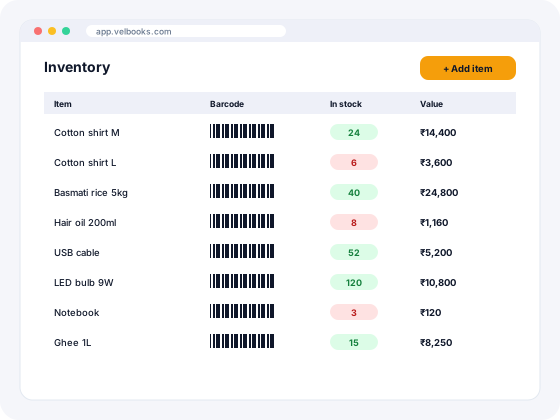
How inventory works in VelBooks
Stock moves only through documents you already create, so there is no separate register to maintain.
- Add items with unit, purchase and selling price, HSN code, GST rate, barcode and opening stock.
- Record purchases when goods arrive. Stock goes up item by item.
- Bill sales at the counter, by phone or from your online store. Stock goes down automatically.
- Check stock any time on any device: quantity and value per item, plus fast and slow movers from your sales history.
- Count and correct a few shelves each week so the system matches the shelf.
Stock register vs Excel vs inventory software
| Paper stock register | Excel sheet | VelBooks inventory software | |
|---|---|---|---|
| Updates when you bill | No | No, manual entry | Yes, automatically |
| Updates when you purchase | Manual | Manual | Yes, from the purchase entry |
| Barcode identification | No | No | Yes |
| Stock value at a glance | Calculated by hand | If formulas are right | Yes, item-wise |
| Check from phone | No | If the file is shared | Yes, in the browser |
| Same items in online store | No | No | Yes |
| Risk of errors | High | Medium to high | Low; still count regularly |
Staying on Excel for now? Download our free stock register format in Excel, with automatic closing stock, stock value and reorder alerts.
Five habits that keep stock accurate
- Enter purchases the day goods arrive.
- Give every item a barcode, including loose items (free barcode label generator).
- Set reorder levels for fast movers: average daily sales × lead time + safety stock.
- Count one shelf or category every week instead of only at year end.
- Review items unsold for 60 to 90 days every month.
Each habit is explained with examples in our inventory management guide for small business.
Inventory software checklist
| Capability | VelBooks |
|---|---|
| Automatic stock update from sales and purchases | Yes |
| Barcode on every item; scan to bill | Yes |
| Item-wise stock quantity and value | Yes |
| Fast and slow movers from sales history | Yes |
| Shared item list for counter and online store | Yes |
| Access from desktop, tablet and mobile | Yes, in the browser |
| Multiple godowns or branches | Ask us |
| Batch and expiry tracking | Ask us |
| Size and colour variants as one style | Ask us (each size/colour can be its own item) |
Who uses VelBooks inventory
Retail Shops · Kirana & Grocery · Pharmacy & Medical Stores · Garments & Apparel · Electronics & Mobile Shops · Hardware & Electricals · Wholesale · Distribution
Run more than one shop or godown? Talk to us about your setup.
Frequently asked questions
What is inventory management software?
Can I use barcodes for inventory in VelBooks?
Is inventory software better than Excel?
Can I check stock on my phone?
What is the best software for inventory?
Which software is used in inventory management?
Is Zoho Inventory free?
How do I calculate a reorder level?
Run billing, stock and your online store from one app
Sign up at app.velbooks.com and use the full app free for 30 days. Questions first? Call or WhatsApp us.
Or call +91 81472 70720 · admin@finacc.in