
Your Shop, Online – in the Same App as Your Billing & Inventory
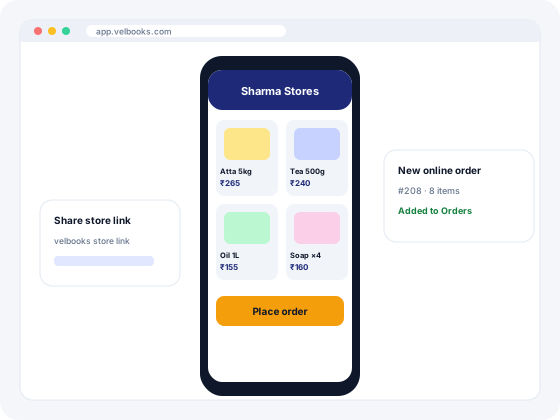
Showcase your products, share your store link and take orders online, then process and bill them in VelBooks along with your counter sales.
How the VelBooks online store works
- Add your products once. The items you sell are already in VelBooks for billing and stock. Choose what to show online, with photos, descriptions and prices.
- Share your store link. Send it to regular customers, put it on your social media and WhatsApp status, and print it on your shop board or bills.
- Customers browse and order. They open the link on their phone or computer, pick products and place an order.
- Process and bill in VelBooks. Online orders arrive in order management next to your counter and phone orders. Pack, deliver and create the GST invoice in the same app.
Why have your own online store?
Marketplaces bring new buyers, but they charge commissions and own the customer relationship. A store of your own works best for regular and local customers who already trust you.
Included in VelBooks
The online store is part of every VelBooks plan, not a separate product you buy and connect. See pricing.
Your customers, your brand
Customers order from your store, not from a marketplace listing next to your competitors.
Orders and billing together
Online orders sit in the same app as billing and inventory, so you don't re-type orders from one system into another.
Open after shop hours
Customers can browse and order when your shutter is down. You process the orders when you open.
Own online store vs marketplace vs WhatsApp catalogue vs website builder
| Marketplace (Amazon, Flipkart, Meesho) | WhatsApp Business catalogue | Website builder (e.g. Shopify) | VelBooks online store | |
|---|---|---|---|---|
| Who owns the customer | The marketplace | You | You | You |
| Fees | Commission and fees per sale | Free app | Monthly plan, plus apps and themes | Included in your VelBooks plan |
| Linked to your billing and stock | No, separate seller panel | No | Only through integrations | Yes, same items, orders and invoices |
| Brings new buyers | Yes, large audience | No, existing contacts | Only with marketing | Mostly existing and local customers |
| Setup effort | Seller onboarding and listing rules | Low | Medium to high | Low, items already in VelBooks |
| GST registration needed | Not for intra-state sales under conditions (see below) | As per normal threshold | As per normal threshold; yes for any inter-state goods sale | As per normal threshold; yes for any inter-state goods sale |
Many shops use more than one: a marketplace for reach and their own store for regular customers. Fees and rules change; check each platform's current terms.
Can I sell online without GST registration?
It depends on where you sell and to whom:
- Through your own store or website: the normal turnover thresholds apply (generally ₹40 lakh for goods and ₹20 lakh for services, lower in some special category states). But any inter-state taxable supply of goods requires registration regardless of turnover (Section 24(i) of the CGST Act). If your store ships to other states, register first.
- Through a marketplace (e-commerce operator): from 1 October 2023, a supplier of goods selling through an operator that collects TCS can skip registration if turnover is under the threshold, sales are only within one state, and the supplier has a PAN and enrols on the GST portal (Notification 34/2023-Central Tax).
- Services through a marketplace: separate rules apply; check with your CA.
Selling food online also needs FSSAI registration or licence, and packaged goods must follow labelling rules. Notification 34/2023-CT. General information, not legal or tax advice.
Ideas by type of business
Kirana & grocery
Let regular customers send their monthly list through your store instead of reading it out over the phone. Kirana billing software.
Learn more →Garments & apparel
Show new arrivals and festive collections with photos so customers shortlist before visiting. Garment shop software.
Learn more →Electronics & mobiles
Showcase accessories and popular models with prices, and take orders for pickup or delivery.
Learn more →Hardware & electricals
Give contractors and electricians a catalogue they can order from, even when they are on site.
Learn more →Pharmacy
Show wellness, personal care and OTC products, and take repeat orders from regular customers. Follow drug-sale rules for medicines.
Learn more →Wholesale & distribution
Share a product catalogue with your trade customers so they can see what's available and order.
Learn more →Getting your first online orders: a checklist
- Start with your 50 to 100 best-selling products, with clear photos and correct prices.
- Write short, useful descriptions: size, pack, brand, colour or model.
- Decide your service area, delivery charges and how you'll collect payment, and tell customers clearly.
- Share the link with your regular customers personally first. They are your most likely first buyers.
- Put the link (or a QR code made from it) on your shop board, bills and carry bags.
- Reply to and fulfil the first orders quickly. Early experiences decide whether customers order again.
- Update prices and remove out-of-stock items regularly so customers trust what they see.
For a step-by-step guide, read how to start selling online for your kirana or retail shop.
Frequently asked questions
Do I need a developer or a separate website to sell online?
Does the online store cost extra?
Can customers order from their phones?
Where do online orders go?
Can I sell online without GST?
What is the best online store for a small business?
How do I start an online store for my shop?
Which businesses can use the online store?
Run billing, stock and your online store from one app
Sign up at app.velbooks.com and use the full app free for 30 days. Questions first? Call or WhatsApp us.
Or call +91 81472 70720 · admin@finacc.in