
Order Management Software: From Order to GST Invoice
Capture every order, check stock, pack, and bill once — without re-typing into a separate invoice tool.
One list for every order
Orders arrive from everywhere: a regular customer phones in, a retailer messages a list, someone walks up to the counter, and your online store gets an order at 10 pm. When these live in notebooks and chat windows, orders get missed or billed wrong. VelBooks puts them in one place.
- Record customer orders as they come in, from any channel
- Orders from your online store arrive in the same app
- See which orders are pending, ready and completed
- Bill completed orders as GST invoices, with stock updated
- Look up a customer's past orders when they call
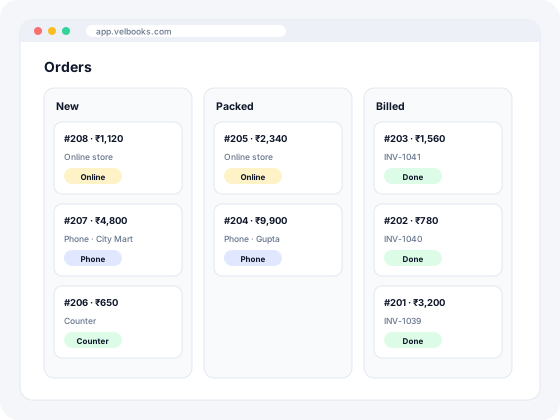
How order management works in VelBooks
Five steps from request to invoice, without copying the same list into a notebook and then into billing.
- Capture the order when the customer calls, messages, walks in or orders on your online store. Save the customer, items, quantity and promised date.
- Check stock and confirm before you pack. Adjust quantities if something is short so the customer knows what will arrive.
- Pack and mark ready when the order is prepared for pickup or delivery.
- Bill once from the same order as a GST invoice (or a non-GST bill). Stock and the customer's account update automatically.
- Close the day by clearing the pending list: anything left needs a call or a new promise date.
Counter vs phone vs online store vs marketplace orders
| Counter / walk-in | Phone or message | Your VelBooks online store | Marketplace (Amazon, Flipkart, etc.) | |
|---|---|---|---|---|
| Where the order is written first | On the bill itself | Notebook, WhatsApp or memory | In VelBooks automatically | In the seller panel |
| Risk of missing it | Low | High if chats pile up | Low | Low in the panel; high if you re-type into billing |
| Linked to stock and GST invoice | Yes, when you bill in VelBooks | Only after you enter it | Yes | Only after you enter or integrate |
| Best for | Walk-in retail | Regulars and B2B repeats | Local and known customers | New buyers and reach |
| VelBooks role | Bill at the counter | Record the order, then bill | Orders land in the same list | You still bill in VelBooks after packing (no marketplace sync claimed) |
Marketplace apps are separate systems. VelBooks does not claim automatic marketplace sync. Record what you ship so stock and GST stay correct. For your own store link, see the online store.
Order management software checklist
| Capability | Why it matters | VelBooks |
|---|---|---|
| One list for counter, phone and online orders | Stops missed and duplicate orders | Yes |
| Convert order to GST invoice without re-typing | Invoice, stock and accounts stay in sync | Yes |
| Stock check before you confirm | Avoid promising what you cannot supply | Yes — check item stock in the same app |
| Online store orders in the same app | No copy-paste from a separate website | Yes |
| Works on phone and counter PC | Take or check orders away from the desk | Yes, in the browser (needs internet) |
| Retailer self-service ordering portal | Useful for large distributor networks | Ask us |
| Marketplace / courier API sync | Auto-import marketplace orders | Ask us — not confirmed |
Order handling habits that prevent losses
- Confirm stock and price before you promise delivery on phone or message orders.
- Publish a cut-off time for same-day dispatch and stick to it.
- Bill exactly what you deliver; adjust the order first if an item is short.
- Start each morning with the pending order list; anything older than a day gets a call.
- For distributors: batch pick lists by route or area so packing is faster.
Distributors who want retailers to place orders themselves: talk to us about your requirements.
Especially useful for Distribution · Wholesale · FMCG Trade · Hardware & Electricals · Kirana & Grocery · Supermarkets.
Frequently asked questions
What is order management software?
What is the best order management software for small business in India?
Do online store orders come into VelBooks?
Is order management useful for a small shop?
Does VelBooks sync orders from Amazon or Flipkart?
What is the difference between order management and inventory management?
Run billing, stock and your online store from one app
Sign up at app.velbooks.com and use the full app free for 30 days. Questions first? Call or WhatsApp us.
Or call +91 81472 70720 · admin@finacc.in