
GST Billing Software That Creates Invoices in Seconds
Professional, GST-ready invoices with the right tax split every time, from any device. Stock and accounts update as you bill.
Create correct GST invoices without a tax manual
A GST invoice is not just a bill with tax added. It must carry specific details, and the tax must be split correctly depending on where the goods are supplied. VelBooks fills these in from your business profile, customer details and item master, so your staff only choose the customer and the items.
- Your business name, address and GSTIN on every invoice
- Customer name, address and GSTIN for B2B invoices
- Item description, HSN/SAC code, quantity, unit, rate and discount
- Taxable value and GST worked out per line
- CGST + SGST for sales within your state, IGST for sales to another state
- Consecutive invoice numbering
- Scan barcodes to add items instead of searching for them
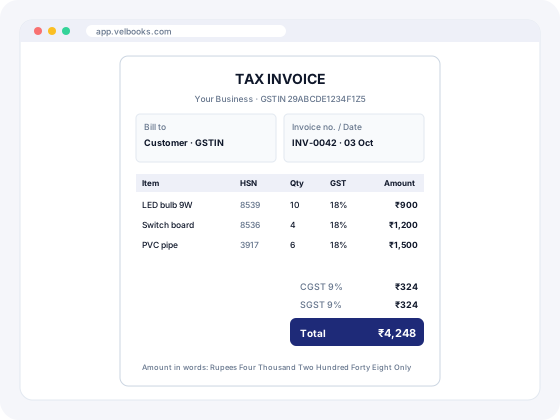
What a GST tax invoice must contain
Rule 46 of the CGST Rules, 2017 lists the details a tax invoice must contain. In short:
- Name, address and GSTIN of the supplier
- A consecutive serial number, unique for the financial year (up to 16 characters, letters, numbers, hyphen or slash)
- Date of issue
- Name, address and GSTIN (if registered) of the recipient; for unregistered buyers, name, delivery address and state are required when the value is ₹50,000 or more
- HSN code for goods or SAC for services
- Description, quantity and unit of the goods or services
- Total value and taxable value after discounts
- GST rate and amount: CGST, SGST/UTGST, IGST and cess as applicable
- Place of supply, with the state name, for inter-state supplies
- Whether tax is payable on reverse charge
- Signature or digital signature of the supplier or authorised person
HSN digits: businesses with aggregate turnover up to ₹5 crore in the previous year must show at least 4-digit HSN codes on B2B invoices; above ₹5 crore, 6 digits are required on all invoices (Notification 78/2020-Central Tax).
Bill of supply: composition taxpayers and businesses supplying only exempt goods issue a bill of supply instead of a tax invoice, without charging GST.
Sources: CGST Rule 46 (CBIC), GST portal. This is general information, not tax advice.
| Sale | Taxable value | GST rate | Tax on invoice | Invoice total |
|---|---|---|---|---|
| Within your state (e.g. Bengaluru → Mysuru) | ₹10,000 | 18% | CGST 9% ₹900 + SGST 9% ₹900 | ₹11,800 |
| To another state (e.g. Bengaluru → Chennai) | ₹10,000 | 18% | IGST 18% ₹1,800 | ₹11,800 |
| Within your state, 5% item | ₹10,000 | 5% | CGST 2.5% ₹250 + SGST 2.5% ₹250 | ₹10,500 |
Want to check a calculation quickly? Use our free GST calculator or make a one-off bill with the GST invoice generator.
How to create a GST invoice in VelBooks
Five steps from sign-up to your first compliant invoice.
- Set up once: sign up at app.velbooks.com and enter your business name, address, state and GSTIN. These print on every invoice.
- Add items: name, unit, selling price, HSN/SAC code, GST rate and barcode. Not sure of a code? Use the HSN code finder.
- Add customers: for B2B buyers, save their GSTIN and state so place of supply is right.
- Bill: choose the customer, scan or pick items, adjust quantity or discount. VelBooks applies CGST + SGST or IGST and totals the invoice.
- Save and print or share the invoice. Stock, the customer's account and your GST data update from the same bill.
B2B vs B2C GST invoices: what changes
| B2B (registered buyer) | B2C (unregistered buyer) | |
|---|---|---|
| Buyer GSTIN on invoice | Required | Not applicable |
| Buyer name and address | Required | Required when value is ₹50,000 or more (name, delivery address, state) |
| HSN digits (turnover ≤ ₹5 cr) | At least 4 | Optional |
| HSN digits (turnover > ₹5 cr) | 6 | 6 |
| Reported in GSTR-1 as | Invoice-wise (B2B table) | Summary by rate and state; invoice-wise for large inter-state B2C |
| E-invoice (IRN) needed | Yes, if your AATO exceeds ₹5 cr | No (dynamic QR code rules apply above ₹500 cr) |
Read the full GST invoice rules (Rules 46 to 55) and check whether you need e-invoicing with our e-invoice applicability checker.
What to look for in GST billing software
| Capability | Why it matters | VelBooks |
|---|---|---|
| GSTIN, HSN/SAC and place of supply on invoices | Rule 46 requires them | Yes |
| Automatic CGST/SGST vs IGST | Wrong split means paying tax again under the right head | Yes |
| Consecutive, unique invoice numbers | Required for each financial year | Yes |
| Non-GST bills | Unregistered branches or exempt sales | Yes |
| Stock updates from bills | Avoids a separate stock register | Yes, with barcode |
| Data for GSTR-1 and GSTR-3B | Saves re-typing sales at month end | Yes |
| Works on phone, tablet and PC | Bill or check sales anywhere | Yes, in the browser (needs internet) |
| Multiple languages | Staff work in their own language | Yes, all languages |
| E-invoice / e-way bill generation | Needed above the e-invoice limit or for goods movement over ₹50,000 | Ask us |
Looking for something free? See whether the government offers free GST billing software, or download a free GST invoice format in Excel for occasional bills.
More than an invoice
Stock updates itself
Each invoice reduces stock of the items sold. See inventory management.
Accounts stay current
The sale shows in the customer's account and your books. See accounting.
Ready for GST returns
Invoice data feeds your GSTR returns, so you don't re-type sales.
Want to send invoices digitally or show payment details on them? Ask us what is available for your plan.
Used by Retail Shops · Wholesale · Distribution · Kirana & Grocery · General Trading.
Frequently asked questions
What is GST billing software?
Is it mandatory to use GST billing software?
How many digits of HSN code should I show?
Can I use VelBooks for non-GST bills?
Can I make GST bills on my phone?
Which GST billing software is best?
Is free GST billing software available?
Can I download a free GST bill format in Excel?
What is the best GST billing app for PC?
Run billing, stock and your online store from one app
Sign up at app.velbooks.com and use the full app free for 30 days. Questions first? Call or WhatsApp us.
Or call +91 81472 70720 · admin@finacc.in