
Barcode Billing Software: Scan, Bill, Done
Scan products at the counter to bill faster and more accurately, with stock updating as you sell.
How barcode billing works
- Each item in VelBooks has a barcode: the manufacturer's code printed on the pack, or your own code for loose items.
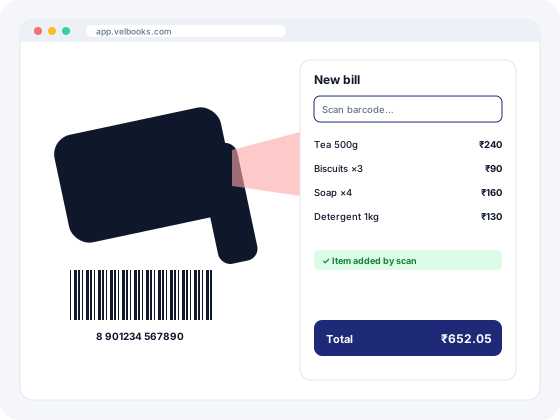
- At the counter, place the cursor in the billing screen and scan. The item, price and GST rate are added to the bill.
- Scan again to add more quantity, or type the quantity. Finish the bill and print or save it.
- Stock reduces automatically for every item scanned.
Why shops switch to scan-and-bill
Faster queues
Scanning is quicker than searching item names, especially when you stock hundreds of similar products.
Right item, right price
No more billing the 500 g pack at the 1 kg price, or picking the wrong size or variant.
Accurate stock
Because the exact item is billed, stock for that item stays correct.
Easier for new staff
A new helper can bill correctly on day one without memorising codes or prices.
Barcodes and scanners: a practical guide
Which barcodes will I see?
Most packaged FMCG, grocery, pharmacy and electronics products carry an EAN-13 barcode issued through GS1. For your own labels on loose items, garments or spare parts, Code 128 is common because it supports letters and numbers.
What if my products don't have barcodes?
Give each item your own code in VelBooks and print labels with a barcode label printer. Garment shops often tag each size and colour separately so the scan picks the right variant.
Which scanner should I buy?
Most USB and Bluetooth barcode scanners work like a keyboard: they "type" the code into whichever box is selected. That is how browser-based software such as VelBooks reads them, with no special drivers in most cases. Check with us before buying hardware if you are unsure.
Are manufacturers required to use barcodes?
Barcodes are mostly a commercial requirement (large retailers and marketplaces ask for them), not a GST requirement. Manufacturers who need globally unique codes register with GS1 India.
Set up barcode billing in five steps
Most shops can go from zero to scan-and-bill in a day.
- List your items in VelBooks with price, GST rate and HSN code.
- Use existing barcodes: scan the EAN code already printed on packaged goods into each item.
- Make your own codes for loose, unbranded or tagged items, and print labels with our free barcode generator (Code 128 or EAN-13, A4 sheets or label rolls).
- Connect a scanner (USB or Bluetooth) and test it in the billing screen.
- Start scanning at the counter. Each scan adds the item and reduces its stock.
Barcode types at a glance
| Type | What it holds | Where you see it | Use it for |
|---|---|---|---|
| EAN-13 | 13 digits (last is a check digit) | Packaged retail goods; issued via GS1 | Products sold through retailers and marketplaces |
| UPC-A | 12 digits | Mostly US-origin products | Scanning imported goods (scanners read it) |
| Code 128 | Letters, numbers and symbols, variable length | Shop labels, garment tags, spare parts, logistics | Your own item codes |
| QR code | Text, links, payment details | Payments, links, packaging | Not usually for item billing |
Hardware checklist
| Item | What to check |
|---|---|
| Barcode scanner | Keyboard-emulation (HID) mode; USB for a fixed counter, Bluetooth for moving around; a 2D imager also reads QR codes and codes on phone screens |
| Label printer | Thermal label printers suit tags on shelves and goods; direct thermal labels fade over months, thermal-transfer (ribbon) labels last longer |
| Labels | Common sizes: 38 × 25 mm and 50 × 25 mm rolls; A4 sheets with 24 or 65 labels for laser/inkjet printers |
| Test first | Print a few labels and scan them from 10 to 20 cm before printing hundreds |
Frequently asked questions
How do I generate a barcode bill?
Do I need a special scanner for VelBooks?
Can I use barcodes on loose items?
Does barcode billing update stock?
How can I print barcode labels for free?
What is the best software for barcode labelling?
Do I need GS1 barcodes?
Run billing, stock and your online store from one app
Sign up at app.velbooks.com and use the full app free for 30 days. Questions first? Call or WhatsApp us.
Or call +91 81472 70720 · admin@finacc.in